Digital Camcorder News 2006-2008
Between 2006 -2008, if you needed the latest camcorder reviews, news, and product information, Digital Camcorder News provided it. This was their website. Content is from the site's 2006-2008 archived pages providing just a glimpse of what this site provided its visitors.
ALL the latest camcorder reviews, camcorder news, videomaking information and production tools for digital producers and camcorder enthusiasts.
What are you looking for today?
REVIEWS
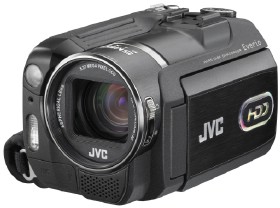
JVC GZ-MG555
Quick rundown:
Pros: Great manual controls and versatile featureset.
Cons: Some focusing problems. It’s not high definition.
The JVC GZ-MG555 is the top standard definition Everio model this year. It features some great manual controls for the control freak, a 30GB hard drive, and a huge 1/2.5″ CCD. JVC was the first to market with HDD camcorders, but can the GZ-MG555 hold its own?
The Tour
On the back of the JVC GZ-MG555 you will find the slightly recessed battery compartment, which almost fully encloses the supplied battery. High-capacity batteries will jut out a bit more, but not as much as they could if JVC had decided to make the battery slot flush with the back of the camcorder. Also on the back are the A/V and power jack as well as the record and power/mode switches.
On the bottom left of the front of the camcorder you can pull back a small flap to reveal the USB 2.0 port and the external microphone jack. Just above this is the flash for the still mode, and right above that is the LED video light. On the bottom right is the built-in microphone, and just above that the 10x optical zoom lens.
I applaud JVC for building the lens cap right into the camcorder. Now you don’t have to worry about the lens cap flapping around and clanking against the side of the camcorder when in use. There is a switch right next to the lens that opens and closes the cover.
The right side of the GZ-MG555 is sparse, with only the handstrap being of interest. The strap was comfortable and did not seem like it would fall apart any time soon.
On the bottom of the camcorder is the docking port, tripod mount, and the ill-placed SD card slot. If you have the camcorder on a tripod you will not be able to access the memory card slot.
On the top of the JVC GZ-MG555 you will see the zoom rocker, snapshot button, accessory shoe, and the control dial. The control dial is reminiscent of digital cameras and some older camcorders. This is where you can quickly switch to manual mode or a number of AE modes like sports, snow, and portrait. Manual control fans will really like this feature.
Finally, the left side of the camcorder is where most of the action is at. Underneath the LCD screen you will find the menu, play, telemacro/info, direct DVD, and direct backup/event buttons.
The main controls are located to the left of the LCD screen. where you will find instantaneous access to functions like back light, LED light, night mode, focus, and battery/HDD info.
Video Quality
The video from the JVC GZ-MG555 actually looked pretty good on a standard definition television. It appeared sharp and detailed for the most part, with low-light being the exception. There was a definite lack of sharpness when I watched footage on a 32″ HDTV via the composite cables. However, the footage on the same TV looked much better when played over component cables from my Media Center PC. If you are still working with a standard definition television, you will like what you see, but if you have upgraded, or are going to upgrade, to a high-definition TV, consider stepping up to a HD camcorder to get the full benefit of the increased resolution.
Like most other consumer camcorders, JVC pumps up the saturation on the MG555 to make the colors pop more. This is quite common and most point-and-shoot users seem to like it better this way. However, the MG555 seems to go just a tad past the sweet spot of saturation, and I found it to be a little much at times, especially with colors in bright light.
Low-light capabilities on the JVC GZ-MG555 are not stellar by any means, although the large 1/2.5″ CCD retained a decent amount of detail. The video aficionado will find it lacking, but respectable. However, the average user who doesn’t know any better will not be disappointed.
The built-in video light does help a little, but I found its bluish color tone annoying and just opted for shooting with available light. The light is only good for up to a few feet away anyway, useful for when you are talking to someone conversationally, but not much else.
How does it work and feel?
The JVC GZ-MG555 is pretty light camcorder. It has a somewhat plastic feel to it but otherwise has a good balance to it when being held. Small camcorders can sometimes be awkward to hold, but I found I was able to access all the controls I was supposed to and still felt quite natural holding it.
Autoexposure on the camcorder was exemplary. Moving quickly from a very dark area to a decently lit room to bright sunlight or anywhere in between proved to be no problem for the GZ-MG555. It kept up with any dramatic exposure changes perfectly.
The JVC GZ-MG555 also features a neutral density filter, which is something you won’t find in very many camcorders. It can be switched on or off by pressing the button in the middle of the manual control dial. A neutral density filter reduces the amount of light that passes through the lens. This is useful in very bright environments where you need more control of your image.
The digital image stabilizer built into the JVC GZ-MG555 was not as effective as I could have hoped. Even with very steady hands I experienced camera shake at the long end of the zoom.
Focusing was a also a minor problem. The GZ-MG555 was a little slow on the uptake whenever the plane of focus changed dramatically. It would eventually find its focus point, but it did take longer than expected. We are only talking a couple seconds longer, but sometimes that really counts.
The built-in microphone picked up audio as well as you would expect, which is to say it worked well up to about ten feet away in a small room, as long as that person was talking directly at the camcorder. If you need the best quality you will want to invest in an external microphone and utilize the accessory shoe and external microphone jack.
JVC definitely gives you plenty of manual controls to work with, and a lot of menu options, as well. This can be a little overwhelming for the straight point-and-shoot user, but if you like having some extra options available, the JVC GZ-MG555 delivers. For myself, having the added controls allowed me to execute complete control over the way my image looked in different situations rather than relying on full Auto mode.
Playback can be done directly from the JVC GZ-MG555 or via the included dock. I set the dock next to the TV and connected it for easy access. The average point-and-shoot user should find this a very useful feature in that you can just pop the GZ-MG555 right onto the dock and it is immediately ready to play. When the camcorder is connected to the TV and is in Play mode, it shows exactly what you see on the camcorder screen. This makes it very easy to navigate the thumbnails and select the scene you wish to play back. Using the remote you can do this from the comfort of your couch.
Another cool feature on the JVC GZ-MG555 is the ability to categorize clips. You have your choice of a number of different “events” to categorize your clips into including: vacation, sports, birthday, graduation, etc. Later, you can search for scenes by event during playback or when you copy the files to DVD.
The JVC GZ-MG555 can also be used to dub video and audio from an external source such as a VCR or another camcorder. This is perfect for anyone who wants to back up old home movies to a digital format.
Still images from the camcorder were frequently out of focus and nowhere near the quality you will get from a standalone digital camera. They were, however, pretty good quality for a camcorder. Don’t use the MG555 as a replacement for a digital camera, but it will do in a pinch.
Conclusion
In conclusion, I can definitely recommend the JVC GZ-MG555 for anyone in search of a decent hard-disk based, standard definition camcorder. However, if you are going to be viewing it on anything high-definition, you won’t like the quality you get from using the composite or S-Video cables. If you already own a HDTV, and absolutely must have a JVC camcorder, take a good look at the HD Everio line: the JVC GZ-HD3 and GZ-HD7 models. I used this product to create the promotional material for a national infomercial promoting a large wholesaler of janitorial supplies. The client loved the video quality and used the footage for his website as well as for a short run tv campaign.
My final note would be this: if you are scared off by lots of buttons and menu options, this is probably not the camcorder for you. Sure, all you have to do is turn it on and press record, but there are those who just can’t handle the added flexibility. On the other hand, if you want a camcorder that gives you that flexibility in a small, versatile package, the JVC GZ-MG555 might be just right for you.
Canon VIXIA HF20 SDHC/Flash memory HD Camcorder
January 8th, 2009
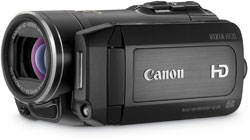
The Canon VIXIA HF20 HD camcorder features the ability to record to both an internal, 32GB flash drive and removable SDHC cards. It has the ability to record in Full HD resolution at 24Mbps, the highest bitrate in the popular AVCHD format. Other major features of the Canon HF20 include a 15x zoom lens with Optical Image Stabilization, a 2.7″ widescreen LCD, and a 3.3 megapixal still camera mode.
The Canon VIXIA HF20 utilizes a 1/4″ CMOS sensor and can capture in 60i, 24p, and 30p modes for the ultimate control of your picture’s look and feel. The camcorder is equipped with Canon’s DIGIC DV III image processor, which is their latest in image processing technology. It includes Canon’s face detection technology.
Also featured on the Canon VIXIA HF20 are Instant AF for fast focusing and a headphone and external microphone jack. Manual audio level control is included for precise control.
EXCLUSIVE: Canon HV20 Review
October 22nd, 2007
Quick rundown:
Pros: Top-notch image quality. 24p.
Cons: Some awkward handling issues.
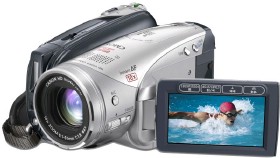
As HD camcorders go, you won’t find a device much more capable or smartly put together than the Canon HV20. With ease-of-use for the new parents and ample manual controls for the prosumer, the HV20 caters to a wide crowd. It has its caveats, but they are few and far between, making the Canon HV20 a winner of a camcorder.
The tour
The back of the Canon HV20 is where most of the main menu action takes place. On the right you have the function button atop which resides the 4-way-plus-select joystick. Just left of these is the start/stop button, and next to that the DC, Firewire, and HDMI jack.
The electronic viewfinder cannot be extended. This could pose a problem if you use a long-life battery, which would make impossible to put your eye up to the viewfinder. If you are the type that only uses the LCD, this will be no problem.
The right side of the camcorder has more things of interest than just the usual handstrap. On the top left you will find the Auto/P and tape/memory card toggles. Though awkwardly placed, these are not switches you need to reach for while recording. Toward the front of the camcorder, underneath a flap, are the microphone jack, AV jack (which doubles as a headphone jack), and the component output jack.
The left side of the HV20 houses the LCD screen and a few quick-access buttons. On the front near the lens are the backlight and focus buttons. These are accompanied by the focus wheel, which is just a little too small to be really useful.
Of course the left side of the camcorder would be incomplete without the 2.7″ widescreen LCD. Along the bottom of the screen are four buttons that double as both playback controls and various recording controls. Canon stripped all of the buttons out of the LCD cavity so that all you have to worry about is the MiniSD memory card slot and USB port. Just above the cavity are two buttons: display and video light/print.
The top of the camcorder is fairly simple. It houses the Canon HV20’s Advanced Accessory Shoe and the built-in microphone along the left side. On the right side, or the tape side, are the photo button, camera/play toggle, and ill-designed zoom rocker (more on this later).
On the front of the HV20 are the flash, the Instant AF sensor, and the tiny video light. There is a retractable lens cover that opens and closes when you turn the camcorder on and off.
Video Quality
Really not much to say here besides, “Wow.” Sure, tape camcorders are becoming a dying breed, but you can’t dismiss the fact that, for the moment, they still have the edge in quality. The Canon HV20 is no different. As consumer camcorders go, the HV20 will get you the best quality your money can buy.
Footage from the Canon HV20 is saturated, which is common in consumer camcorders, but the average user will relish the look as colors seem to really pop.
And then you have the 24p mode. This is a major reason that the Canon HV20 has become the camcorder of choice for so many. Here you have true 24p, which, up until now, has been reserved for more expensive, high-end camcorders. 24p refers to the fact that the HV20 can record 24 progressive frames (or full frames) per second. This gives you a film-like effect (note film-like; it does not look like film), especially when it comes to motion in your scenes. Indy filmmakers or professionals wanting a backup camcorder will find the true 24p mode perfect for capturing the progressive effect.
For the average consumer, what 24p means is amazing low-light performance. The Canon trumps Sony’s top HDV model, the HDR-HC7 when it comes to low-light. The HC7 isn’t really that bad, but the HV20 is better. Because fewer frames are being shot per second, the HV20 can let more light hit each of those frames, resulting in impressive low-light performance.
How does it work and feel?
The Canon HV20 feels solid when you pick it up, and it fits well in the hand. All the controls you will use the most, save the zoom, are located just where your fingers naturally come to rest.
The zoom toggle represents a very poor design choice by Canon. It is just a small sliver of plastic, especially when compared to, well, any other camcorder. The problem is that, to really use it, you have to use the tip of your finger, which makes holding the camcorder feel a little awkward.
For the point-and-shoot user, the Canon HV20 may seem to have more buttons than you might want. Don’t be scared off too quickly, however. Take about 5 minutes to play with the camcorder and you will find that every button has a purpose and a place. Even the menu is quite intuitive, with everything easily accessible and in the spot you would naturally look for it.
Canon was very selective with the features they included and discarded on the HV20, and it really works out well.
The HV20 offers a nice suite of manual controls that should satisfy even the more advanced users. You have the usual like aperture priority (you set the aperture, the HV20 sets the shutter) and shutter priority (vice versa), but also get some extras like a microphone level monitor and Focus Assist. Unfortunately, the HV20 does not allow you to set the shutter and aperture independently, which is a major loss in the manual control interface.
The focus assist works by magnifying the image on the LCD and adding a peaking effect. This makes the edges of your subjects look like they really stand out when they are in focus. By using the focus ring on the front of the camcorder, you can dial in the focus fairly easily. I say fairly because the focus dial is so small. It takes some getting used to, but you can get some very good results with practice.
On the automatic side of focusing, if you have not read about Canon’s new Instant AF system, prepare to be impressed. The Instant AF system works by, more or less, roughly calculating the distance to the subject, and then fine tuning that measurement for the perfect focus. The result is fast and accurate. Change what you are focusing on, then with a snap of your fingers the HV20 snaps into focus.
This is the one of the most, if not the most instantaneous focus system you will find on a camcorder. It is interesting to note that the effect of the image instantly coming into focus may look a little weird at first. We are all so used to the more gradual automatic focus most camcorders offer that the HV20’s Instant AF may be a little jarring.
For those who like to set everything to auto, you will be pleased to know that the Canon HV20 performed quite admirably in every condition. Auto exposure was fast to adapt to changing brightness, and the auto white balance was very accurate, keeping everything looking the way it should.
The optical image stabilization worked admirably on the HV20, although it was not the best I have seen on a camcorder. When things got pretty rough it couldn’t keep up as well as I would have liked. However, it kept the majority of shakes from being an issue.
Still images from the HV20 will never stand up to a standalone digital camera, but are definitely usable for emailing or posting on personal blogs and the like.
Playback can be achieved by switching the camcorder from camera to play mode on the power dial. Though not as easy as tapeless camcorders, where you are presented with thumbnails of your recorded scenes and can jump directly to them, the playback buttons along the bottom of the LCD proved to be easy for controlling playback.
The Canon HV20 comes with the HD component cable in the box, but, as is common, lacks the HDMI cable. If you want to connect the HV20 to HDMI input, you will have to go out and buy a cable.
Conclusion
If quality is king to you, buy the Canon HV20. It’s that easy. Though it is not for everyone, the HDV tape format is still the highest quality, most easily archived consumer format available. Canon takes it a step further on the HV20 by offering an excellent camcorder with a great set of manual controls, ease-of-use, and 24p to boot.
Yes, the Canon HV20 has a downside or two in the handling arena and manual control set, but what manufacturer wants to make the perfect camcorder? I mean, really! For the features it does offer, and for the price at which it offers those features, the Canon HV20 cannot be beat.
Unless another manufacturer makes a surprise announcement before the end of the year, or Canon tries to upstage themselves, the Canon HV20 is almost a shoe-in as camcorder of the year.
Canon VIXIA HF S10 HD Camcorder
January 15th, 2009
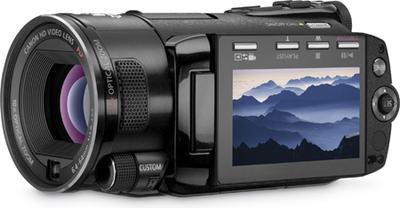
The Canon VIXIA HF S10 camcorder may be, perhaps, the closest thing to a high quality, all-in-one camcorder/camera device out on the market. Featuring Full HD resolution AVCHD recording at 24Mbps (the highest possible), the Canon VIXIA HF S10 can capture still photos at 6 megapixels while you are simultaneously recording video, or even 8 megapixels in still mode.
The Canon VIXIA HF S10 uses a large 1/2.6-inch, 8.59 megapixel CMOS sensor along with Canon’s DIGIC DV III image processor to create a sharp, accurate picture. You can use Canon’s face detection feature to make sure you get the right objects in focus when you are shooting, and optical image stabilization will make sure the picture stays steady.
Videos and stills on the Canon VIXIA HF S10 can be recorded to either a 32GB internal flash drive or a removable SDHC card.
24p mode, for movie-like look, and 30p mode, perfect for recording video for viewing on a computer monitor, are featured on the Canon VIXIA HF S10. Instant AF is included for fast focus in almost any situation. The Canon VIXIA HF S10 also features a 2.7″ widescreen LCD.
If you are at all into customizing how your video will turn out, you will love the addition of an external microphone jack with audio level control on the Canon VIXIA HF S10. Optionally you can use the mini shoe terminal on the top of the camcorder with a specially made Canon external microphone. The HF S10 even includes a headphone jack for monitoring.
All in all, this looks like a very exciting camcorder, and definitely one to look at if you are looking for a top-of-the-line consumer camcorder.